Every fifth full box per lot is available for preordening.
Simply click on the light blue number of boxes in de browser of the Pefa Auction Clock.
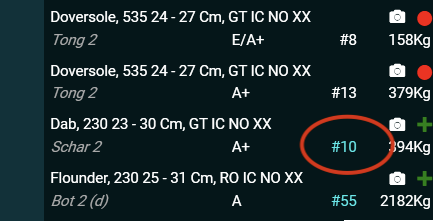
The price will be based on the average price of the lot and is automatically calculated after the lot is sold. Please pay attention to the percentage in the confirmation pop-up.
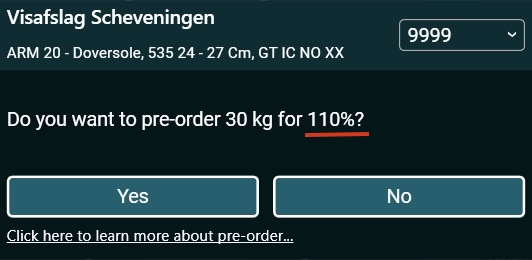
Pre order is only available in the Windows version of the Pefa Auction Clock.
]]>The post New version Pefa Auction Clock appeared first on pefa.
]]>The new version has three options. You can either see only the photos, the photos and transaction list combined or just the transactions. You can make a setting per fish auction. The position of the overview of active fish auctions has been changed. In the image below you can see the changes.

The post New version Pefa Auction Clock appeared first on pefa.
]]>The post Pretake your fish appeared first on pefa.
]]>
Browse through the unsold actual supplies to find the lot of your interest. You can either use actual supplies to browse vessel by vessel or just pick the specie of choice in “Overview Supplies”.
Click on the green plus icon to add a pretake.
Make your choice:
Partial: Specify how many boxes you would like to buy.
Incomplete: buy as much as possible.
Complete: only the full lot.
Set your price in your own currency.
The clock will automatically stop when it reaches your price.
The post Pretake your fish appeared first on pefa.
]]>The post Watch the demo of Pefa eLog appeared first on pefa.
]]>Voilà: check our demo of Pefa eLog. With this application fishermen can do their catch registration the easy way.
 Pefa eLog
[list icon=”check-2″ iconcolor=”#fdb913″]
- Work easy at sea.
- Have access everywhere at your smartphone, tablet or laptop.
- Don’t worry about updates.
- Relax because your data is safe.
- Work smart for a fixed price per month.
[/list]
Simple catch registration. Online. [button link=”/services/” color=”default” size=”large” style=”simple” icon_pos=”left” target=”_self” align=”none” lightbox=”false”]Discover more[/button]
The post Watch the demo of Pefa eLog appeared first on pefa.
]]>